Thursday, 6 February 2014

Back in Black....Light Retribution!

It has been a while since I have updated this blog, that is because I was on holiday. I know, I should be able to update more during the holidays, but I wanted a more relaxed time, so skipped the updates on my blog. Anyways, back to the topic at hand, which I have yet to explain or elaborate on, which is a game I have played for quite a while and stopped because of some technical issues and then hopped back in.


And I have to say that the issues I had were pretty annoying, the game not updating, taking forever to verify the client, and also minor issues with Punkbuster, the software used to connect players online in Blacklight Retribution. As the title of this post explains, I did start playing Blacklight again after managing to solve these issues. How you ask? Painfully having to uninstall the game and re-download the whole installer. Yeah, that took a while, but that's how much I liked Blacklight.

Moving on, this post might get a bit technical, but the main reason why I decided to post this was the changes they had added to Blacklight, both in terms of content and optimization of the game. Just to give you a perspective of my gaming rig, or more honestly speaking, my laptop, here are the specs :

Intel Core i5-3210M
Nvidia Geforce GT 650M with 2GB of dedicated VRAM (and no there is no "X" after GT, I checked the official site)
8 GB of 1600 MHz RAM
750 GB HDD

and last of all, the screen resolution that I am playing on is 1366x768, a little bit better than 720p.

This doesn't sound like much, its more of a high medium class gaming computer (barely up to the level of most of you guys with dedicated hardware), and I know guys out there with much much better computer, with their overclocked CPU, GPU and in some rare cases RAM, with an SSD for running games. However, after I had reinstalled Blacklight, about a few months ago, I played around with the settings and fine tuned it for the best gameplay experience. Then, just out of curiosity, I decided to run fraps in the background and see just how the framerate was at the "best gameplay experience" settings. It was fluctuating at a steady 100 to 140 FPS! I was shocked, and no it wasn't just guys running around shooting each other, even in stages where guys were spamming Brimstone Airstrike and having up to 5 Hardsuits blasting each other with their guns, plus a few guys firing at us with Armour Stingers. So then I wondered, how far could I push my hardware.

First things first, why was this such a shocker to me? Well, the year before, I played Blacklight on higher settings, and found that the average FPS I was getting out, even at these low settings was about 40 to 50 FPS, and after enabling things like DX11, ambient occlusion, light shafts and motion blur with a small 2x Antialiasing, the frame rate dropped to just slightly playable, 25 to 30, tops was 38, and Brimstone Airstrikes didn't really affect and cause a substantial drop in FPS. And after exiting the game, my computer would just lag and stutter for a few minutes. Initially, the problem was I had too little RAM, how much? 4 GB, just enough. I added on an additional 4 GB of RAM just so that I could multi-task my applications more, and that pretty much solved the huge lag after leaving the game (note that this shows 4 GB is going to become barely enough for newer games in the future).


(Above) The initial settings I ran on to get smooth gameplay. However, the frame rate was high it produced tearing, but nonetheless, smooth gameplay.


(Above) The settings I currently run on, still smooth gameplay experience, what more could I ask for... ok maybe a higher resolution.

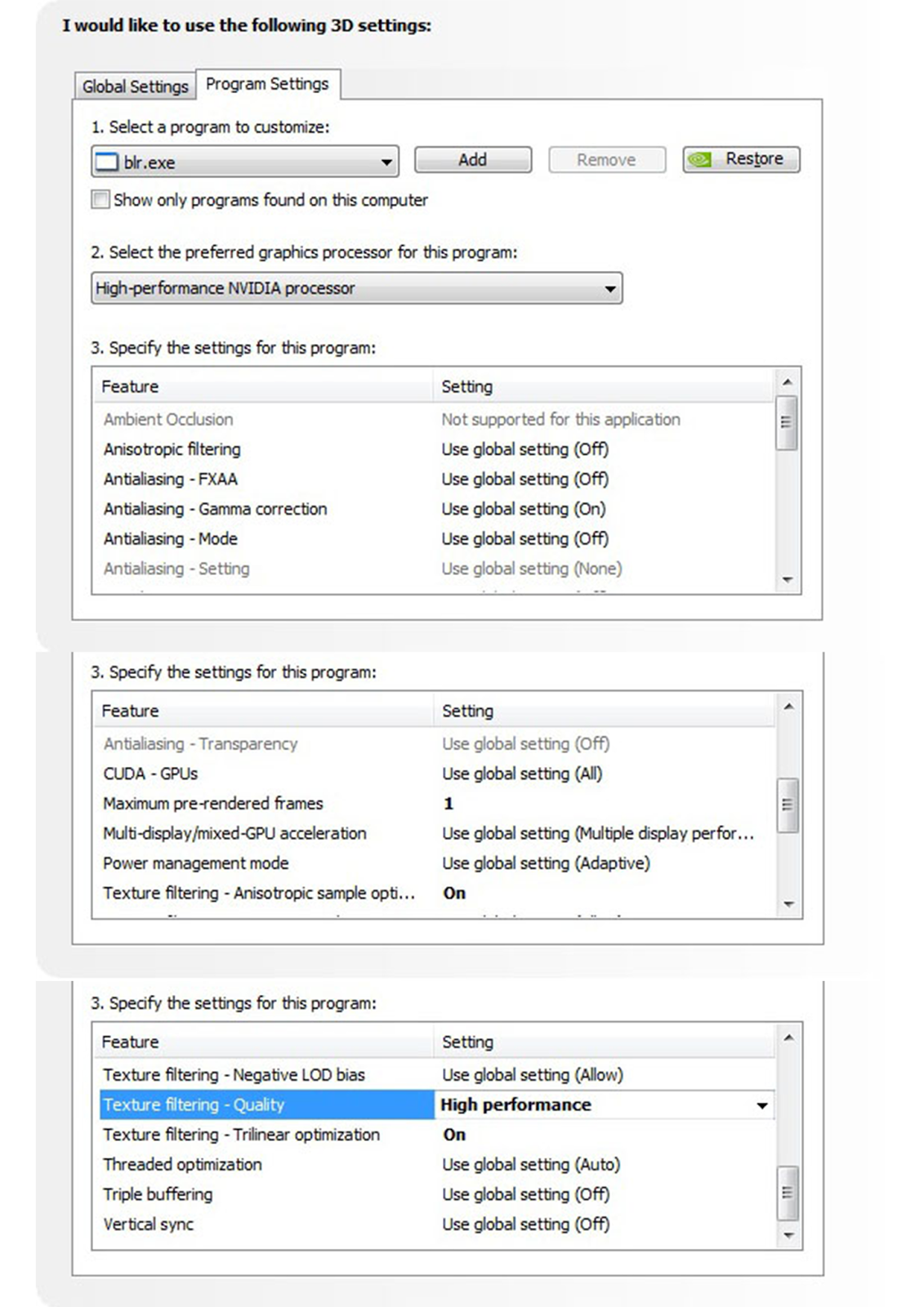
(Above) Nvidia Control Center settings I used for the game. Left is best performance, right is my current settings for the best performance with best possible graphical beauty.


And after playing Blacklight again, I start to wonder, why such the giant leap from barely playable to smooth in about a year. Well, you guys might say, better optimization on Zombie Studio's part or better drivers on Nvidia's part, but I started thinking, and now we are back to the aforementioned, how far could I push the hardware I have.


(Above) Gameplay footage, need I say more?

To start off, I slowly enabled more settings, seeing how much of a drop in frame rate I got after the change in each setting, but mostly, light shafts and ambient occlusion (both in game settings not on the Nvidia driver, I'll get to that later) eat the most performance out of my computer. Meaning after enabling those 2, I have about 70-80 FPS, however, these were running on DX9, after enabling DX11, and basically maxing out everything, from world detail, character detail, to setting tessellation to max, the frame rate stayed at about 70-80. Not bad, not bad at all, but now on the Nvidia driver side, just to squeeze out a little bit more juice out of my system, the previously texture settings which was set to High Performance, was changed back to Quality, also changed anistropic filtering to 4x and antialiasing to 4x, just to smooth those out the look of the game, and the game still ran at 50-60 frames. This was good, I did not have to enable vertical sync because the refresh rate was basically almost identical to my screen's refresh rate, 60 Hz, and thus no tearing. The lowest drop in FPS I could obtain was by moving my mouse around really fast, the FPS dropped to 40 FPS, and that was still acceptable, since I had been playing at around that frame rate when I started.

What am I trying to say? This is a good thing, better optimization (this is running Nvidia, I didn't have the opportunity to test out AMD based systems) lets this game run better, but also would allow people who started out at unplayable might get a chance to play it now. A few tips if your computer doesn't have a dedicated GPU, just change you integrated graphics settings to High Performance instead of Quality, and slowly increase it until you get your comfortable frame rate.


Farid

Friday, 24 January 2014

Project Nimbus on Kickstarter!


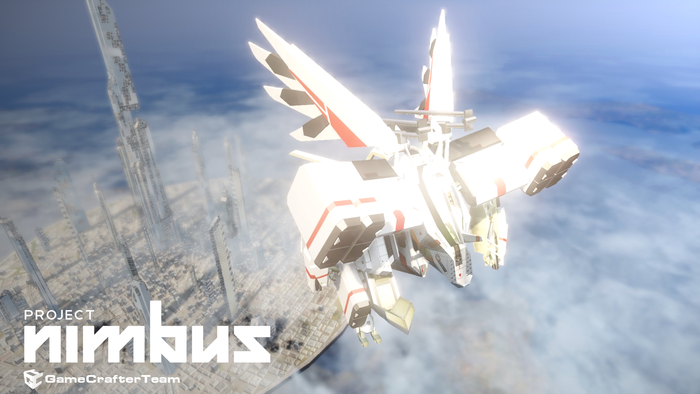
I actually came by this game by accident, and a happy accident that is! The name of the game is Project Nimbus, by KISS Ltd. from Phuket, Thailand. Now Project Nimbus was one of those games I really wanted available for the PC. Some of you readers of this post might think, "Oh, why always wait for games to come to the PC, why not get a console and play those games?!". Well a simple answer to that is I want to play as big of a game library as I can one a single (well, ok, two, because I have a 3DS) platform, the PC, and the fact that I picked the specs on my laptop so that at the very least they can support those games (they can and I am thankful). Basically, I'm trying to get the most value out of all the money spent.


Ok, back to the game. Project Nimbus looks a lot like the Armored Core franchise in combat style as you view your mech from a third-person's point of view, which is how I like it. And as I read through the descriptions of the game from the developers themselves, this game will be featuring a single player mode where you can explore the story and the universe brought to you by the game. The mechs are humanoid, and the design is, well, more towards anime or japanese if I can categorize the design style, since most mechs from american or english movies tend to be more realistic in design. And I don't have a problem with that. While I like the fact that the action in the game looks fast-paced and guns blazing, all the action takes place in the skies. I watched some of the demo gameplay videos on the Official Site for Porject Nimbus, and its looks fast, snappy, but in terms of sound, it lacks a little bit, however it is an early demo of the game, so hopefully they will improve on that aspect.


(Above) A little bit of demo gameplay for ya!

One of the main features I hope they add is deep customization for the mechs that you will use, and also a multiplayer mode which would be sweet. As some of you might know, I play Hawken, a first-person mech shooter, but Project Nimbus is nothing like Hawken since its major aspect is aerial combat, whereas Hawken is more of a land based shooter. And in graphical sense, Hawken was made more of a cinematic master piece, whereas Project Nimbus seems to be not up to that level, but that just graphics and both games are using the every popular Unreal Engine. I'm not sure whether I would still enjoy Hawken the same way as my main reason for playing it was because such mech games are rare on the PC, some of the only available ones would be Mech Warrior Online, which I don't quite fancy and Front Mission Evolved which I had high hopes for, but after playing it, didn't like it at all. Project Nimbus falls more into what I like to have in a mech shooter, third person view and fast paced action, and I await its release!

Link to the Kickstarter Page! (Support it if you like it!)


Farid

Monday, 6 January 2014

MG Heavy Arms Custom, I thought you were blue?

I has been a while since I updated this blog on anything Gunpla related, but I have been busy, and building Gundam models takes up a lot of time. But anyways, I have recently finished building a Master Grade model, something I've always been excited about. The model I am talking about is Gundam Heavy Arms Custom, which you also know by the title.

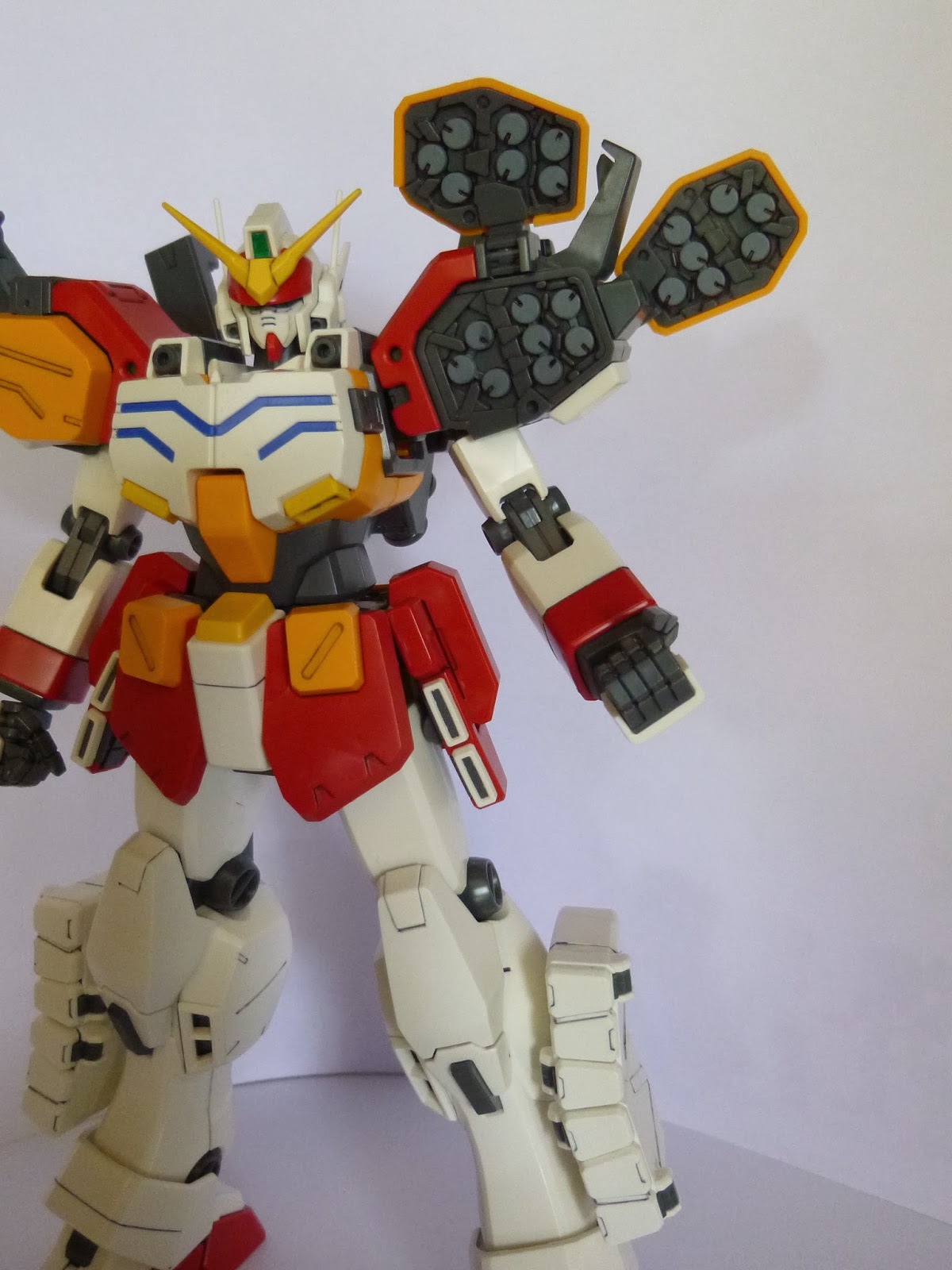
Now, I had my fair share of surprises while building this model, which I will share with you further in this post. One of the very first surprise was that no stickers were prescribed for this model (just felt like using that word, not sure whether it works here). That's right, the 4 small lines on the chest of this model are separately molded in blue for the chest area. For me, this was something I appreciated a lot, since I don't really like (okay, I HATE) using stickers. And the fact that these parts were separately molded makes the model look absolutely more cleanly built than it would ever be if the parts were coloured using stickers, or painted on. While some maybe argue that a paint job using an airbrush and well placed masking tapes, even those guys would be thankful for these separately molded parts.


Another slightly unpleasant surprise was that I thought no painting or stickers were required to completely straight build this model (aside from the eyes and head sensors that is), but there were parts which required painting, and for this model, it so happened to be the missile packs and the missile pods themselves. Yup, count them, count them all, and those, need painting.


As you can see in the pictures above, the missile pods, all of them, which are the lighter tone of grey, and the middle section of the missile packs on the legs, which is grey are all painted. This surprised me a lot actually, as they could mold the blue lines on the chest separately, why they didn't do the same for all these missiles. However, I enjoyed painting them, and if I do say so myself, the contrast of the light toned missile pods make the model look quite nice, and stand out more. In the sample model on the box and the manual, the missiles are painted a lighter tone of grey, much lighter than my model, but I think it looks fine.


Another surprise I was faced with, this one a good one, was how solid most parts feel after they are assembled. As you can see in some of the picture above, the model has many parts that open up to reveal the missile pods inside, and these parts are just as solid. Props to Bandai for this.


One of the problems I have faced though is the knife that is supposed to be a last resort weapon, I mean, this is not the weapon to use as a main, and on the left pic, you can clearly see the knife not being able to fold completely if the arm is straight, though not really to noticeable (*eye twitches*), I wish they made it easier for the model to hold. 


In the picture above are the only removable weapons and items that come with the model, to remove the other weapons or armaments, you'd have to basically remove the gundam models armour. The main highlight, THAT, HUGE, GATLING GUN!!


The gatling gun and the ammunition pack both have 2 teeth that are used to house them on the back of the gundam.


Those lines are where the teeth hook on to.


(Above) Like so~


(Above) This is the model fully equipped with all armaments and weapons.


When trying to pose the model while holding the gatling gun, the fixed hands really help with how stable and firm of a grip the model can provide. However, it is quite hard to equip it to the model.


Thankfully, the gatling gun in the hand is very stable. But after a few times having the model hold the gun, I did realize the hand become a bit loose.


Armaments all ready to fire!!! I try to imagine how scary this would look as some enemy mobile suits try to rush and attack Heavyarms and he goes out guns blazing and missile pods firing. 


I was extremely happy with this model, everything felt solid, a slight weight to them. The articulations for the arms and legs are just good enough, however, much much better than that of the MG Unicorn Gundam if any of you readers have purchased and put together the model. An almost full 180 degrees for both the arms and legs.


And last of all, you can see Trowa Barton in the cockpit. What puzzles me is how noisy it must be in the cockpit, unless some kind of noise dampening system is used to silence the chest machine guns. And that is all, finish!


Farid

Friday, 13 December 2013

Contrast, Something New!

I was busy this week having assignments and other stuff which I had to submit and because of it, this post is delay severely, but anyways, back to business. Well, Contrast's idea might not be completely new, as a similar mechanic has been implemented in the new 3DS game The Zelda : A Link Between Worlds. I'm not sure if many of you reading this have actually heard of this game, and if you have not, let me break it down for you. It's basically a puzzle game in which you play as a little girl's imaginary friend and using lights and shadows you work your way through the different levels. So, basically, with the amount of platforming needed in the 3-Dimensional world itself, you have the added shadow puzzles/platforming making this game quite unique.


While I don't know how many gamers know about this game, I think that it deserves its time in the spotlight, and also since I don't really want to spoil the entire experience, I have only uploaded gameplay footage of the first few minutes of the game.


While I have to admit that the video is a bit long for a game preview, but I just wanted to show how cool some of the shadow play (see what I did there) is. And if you guys who watched the video have noticed, girl is talking to a shadow of her mother, hmmmmmm? Intriguing, huh?!?!

As I have already finished the game, and that I'm still unsure of whether or not I should explain more about the game other than what you can already watch in this video, from the graphical point of things, this game is beautiful. Of course when you compare such a game to big titles like Crysis 3, Assasin's Creed IV Black Flag, or even Call of Duty Ghosts, it can't compare. But the overall look in a sense is definitely not an eyesore, and mostly pleasing, just like how Bioshock Infinite wasn't an eyesore as well. The soundtrack is impressive, and of course to suit the theme of the game, some old songs are played, and these songs are very catchy. The game does have a few bugs, but so far through my playthrough of the entire game, I have only found one really bad one, from which I had to restart from the last checkpoint.

The game is available on Steam if you have an account, and so far it's selling at 14.99 USD, not a bad price for a game. However, just as I was thinking of whether I should mention it, I've decided I will, this game is short. So, most probably you will get through it in less than the new standard 6 hours plus, but for 14.99 USD, that pretty decent, seeing as other games mostly come at 59.99 USD, and a few can be completed in less than 4 hours.


Farid

Tuesday, 26 November 2013

The Aquila-X, is it good?


The Aquila-X is one of the entry level gaming mice from Armaggeddon. Originally I had purchased this mouse because my older supposedly "gaming" mouse was supposed to last me a while, though one year is hardly lasting for me. Priced at RM 69.90 from the store I bought it from, it was quite a hard choice for me as there were many other cheaper mouse which I could have easily picked but I decided to try out gaming products from Armaggeddon. 


Going over the cosmetics first, the mouse comes with a matte finish covered with a soft touch feel. As you can see from the images above, the mice also has LED lines along both sides of the mouse which light up red on my model, but most other models light up blue. Though the mouse comes with many other patterns on the mouse itself, and different colours as well, like red (as shown above), green, yellow and blue, though they're LED lights are either blue or red and you cannot change the colour of the LED. And as you can see it is very apparent that this mouse does not come with macro keys like other similar looking gaming mice such as the Steel Series Kana, Sensei and Kinzu, while not having the two side thumb buttons of the Kana or the Sensei. It also shows that this mouse is suitable for real-time strategy games like Starcraft II but work well on other genres like first-person shooters too, more on that later. The scroll wheel has a textured surface, adding a more expensive look in my opinion. It also has an ambidextrous design making it a just as comfortable for left-handed users, but this also leads to a less comfortable design compared to mice like Func's MS-3 or the Razer Naga which has a place for your pinky finger to rest comfortably.


The button below the mouse changes the CPI of the mouse. The basic four different CPIs are 400, 800, 1600 and 3200, and the colour of the CPI button changes accordingly, starting from off to red and ends at the blueish green. It's not really a selling point, and maybe some of your OCDs will be tested seeing green and red, but its nice to know what CPI setting you're on, and you can play around with the software which you will have to install to change certain settings on the mouse.


There are a few additional features that come with the mouse, the software would be one of them, which does let you change how bright the LED lights shine, and also allows you to add breathing effects. The software also lets you set macro-keys which will be brought with the mouse itself since it does come with 64 KB of Onboard memory, and it lets you set up to 5 different profiles. It's cool that they let you set up custom keys for the mouse but since they are just 4 different buttons on the mouse. A braided cable is a welcome feature which they have added to this mouse, which does make your cable last longer and not suffer too much damage from animals like cats (I have 4 at home, and previously I had lost 2 devices because of them, love them though). 

On to the overall feel, it is very comfortable to hold and use, and we have to thank the soft touch feel for that. It also makes it easy to grip the mouse and also prevents it from slipping off your hand while you're in those stressful gaming situations. I would recommend this mouse for those who like to claw-grip their mouse, users who like to palm-grip might consider opting for a different model. The mouse also has three large teflon feet, and they glide across most suitable surfaces quite smoothly. The left and right buttons are just as they should be, and are just as comfortable.

I tested it out on a few games, and very clearly it shows you which group of gamers it is aimed at. It mostly for those that prefer to use the mouse without additional macro-keys. It works superbly on Starcraft II, I played a few games and also was still comfortable to use over those long periods. It worked fine for Dota 2 as well but for games like Blacklight : Retribution, which I had already set my previous mouse's thumb buttons to weapon slots 3 and 4. And though it does take some time getting used to, not having the thumb buttons make it a little harder to access my grenades which are on weapon slots 3 and 4 (yes, I carry 2 grenades). I had also played Hawken with it, and works fine as well. 

This mouse is well-made, and the soft touch feel and matte finish keep the mouse from looking like a cheap product and adds a certain premium feel to it. And although it is an optical mouse, using a suitable surface won't present any problems with using it. I did face only one problem with it, which is the mouse suddenly starts trailing randomly (not across the screen just a small area) when left for a while. This does not happen while you are moving the mouse, only after you leave it for a while which happens a lot while when I watch movies. And what surprised me was it only happens when I leave it on the mouse pad which was also a product from Armaggeddon, and not on the black table the mouse is resting on in the pictures. But since it doesn't affect me when gaming, it might just be me. As a final verdict, it is a good mouse and for the price if you want a gaming mouse, at a cheap price, bare minimum, no bells and whistles this is an excellent choice, but that is pretty much as far as this mouse goes.